Conceptual view
Consider the following setup, where a merchant (you) maintains a solution for the shopper (your customers) to tokenize cardholder data (CHD) using our Commerce SDKs. The SDKs exchange the sensitive data into Commerce tokens, which are passed back to your backend.
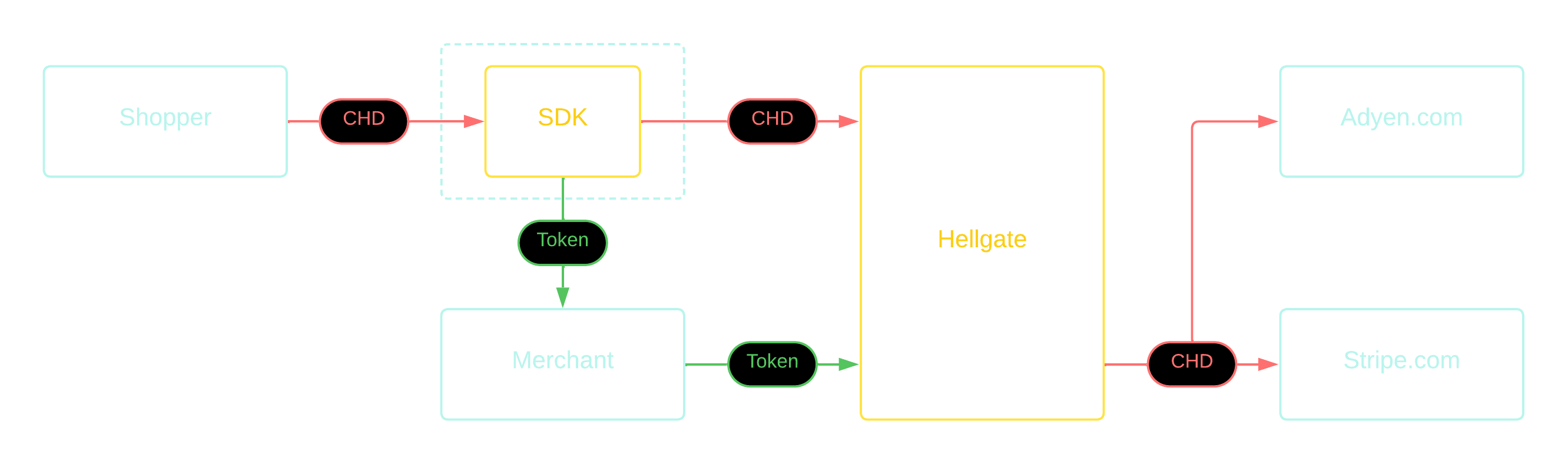
With that you as the merchant are free to create tokens with any payment service provider of your choice. The token will be exchanged by Commerce on the go with the original cardholder data.
Exemplary use
The Commerce compliance service is responsible for exchanging token information with original cardholder data in a secure way. Please see our API documentation for technical details on how to use this service.
Instead of calling the API of your payment service provider directly, you send the request to Commerce and instruct how the sensitive information of the cardholder will be used.
Cardholder data can only be forwarded to allowed destinations. To add allowed destinations, please contact your Commerce representative. Any attempts to forward data to non-allowed destinations will result in a rejection.
Worldpay (2024-06-01)
Adyen v69
Checkout.com
Stripe
curl --location 'https://api.hellgate.io/forward' \
--header 'Content-Type: application/json' \
--header 'X-API-KEY: YOUR_HELLGATE_API_KEY' \
--header 'X-HELLGATE-TOKEN: d7d272f7-f0e8-44c6-9459-c60e1ef279d5' \
--header 'X-DESTINATION-URL: https://try.access.worldpay.com/api/payments' \
--header 'X-WP-API-VERSION-NAME: WP-Api-Version' \
--header 'X-WP-API-VERSION-VALUE: 2024-06-01' \
--header 'X-WP-AUTHORIZATION-NAME: Authorization' \
--header 'X-WP-AUTHORIZATION-VALUE: YOUR_CREDENTIALS' \
--data '{
"transactionReference": "a260bde0-8dee-4feb-bc4a-0af2b851584d",
"merchant": { "entity": "default" },
"instruction": {
"method": "card",
"paymentInstrument": {
"type": "plain",
"cardHolderName": "Sherlock Holmes",
"cardNumber": "{{ account_number }}",
"expiryDate": { "month": {{ expiration_month | unwrap }}, "year": {{ expiration_year | unwrap }} },
"billingAddress": {
"address1": "221B Baker Street",
"address2": "Marylebone",
"postalCode": "SW1 1AA",
"city": "London",
"state": "Greater London",
"countryCode": "GB"
},
"cvc": "{{ security_code }}"
},
"narrative": { "line1": "trading name" },
"value": { "currency": "GBP", "amount": 42 }
}
}'
curl 'https://api.hellgate.io/forward' \
-X 'POST' \
--header 'Content-Type: application/json' \
--header 'X-API-KEY: YOUR_HELLGATE_API_KEY' \
--header 'X-HELLGATE-TOKEN: d7d272f7-f0e8-44c6-9459-c60e1ef279d5' \
--header 'X-DESTINATION-URL: https://checkout-test.adyen.com/v69/payments' \
--header 'X-API-KEY-ADYEN-NAME: X-API-KEY' \
--header 'X-API-KEY-ADYEN-VALUE: YOUR_ADYEN_API_KEY' \
--data '{
"amount": { "currency": "EUR", "value": 1234 },
"reference": "Payment-0001",
"paymentMethod": {
"type": "scheme",
"number": "{{ account_number }}",
"expiryMonth": "{{ expiration_month }}",
"expiryYear": "{{ expiration_year }}",
"cvc": "{{ security_code }}"
},
"merchantAccount": "YOUR_ADYEN_MERCHANT_ACCOUNT",
"recurringProcessingModel": "CardOnFile",
"shopperInteraction": "Ecommerce",
"storePaymentMethod": "true"
}'
curl 'https://api.hellgate.io/forward' \
-X 'POST' \
--header 'Content-Type: application/json' \
--header 'X-API-KEY: YOUR_HELLGATE_API_KEY' \
--header 'X-HELLGATE-TOKEN: d7d272f7-f0e8-44c6-9459-c60e1ef279d5' \
--header 'X-DESTINATION-URL: https://api.sandbox.checkout.com/payments' \
--header 'X-AUTHORIZATION-NAME: Authorization' \
--header 'X-AUTHORIZATION-VALUE: Bearer YOUR_KEY' \
--data '{
"source": {
"type": "card",
"number": "{{ account_number }}",
"expiry_month": "{{ expiration_month }}",
"expiry_year": "{{ expiration_year }}"
},
"amount": 6540,
"currency": "EUR",
"reference": "Payment-0001"
}'
For this payment service provider, the cardholder data cannot be used directly. The card needs to be imported first, but be then used in a payment.curl --location 'https://api.hellgate.io/forward' \
--header 'X-HELLGATE-TOKEN: d7d272f7-f0e8-44c6-9459-c60e1ef279d5' \
--header 'X-DESTINATION-URL: https://api.stripe.com/v1/payment_methods' \
--header 'X-API-KEY-VALUE: YOUR_STRIPE_API_KEY' \
--header 'X-API-KEY-NAME: Authorization' \
--header 'Content-Type: application/x-www-form-urlencoded' \
--header 'X-API-Key: YOUR_HELLGATE_API_KEY' \
--data-urlencode 'type=card' \
--data-urlencode 'card%5Bnumber%5D={{ account_number }}' \
--data-urlencode 'card%5Bexp_month%5D={{ expiration_month }}' \
--data-urlencode 'card%5Bexp_year%5D={{ expiration_year }}'
Then the returned payment_method_id can be used in the payment, but this does not require the use of the Compliance Service.