This document describes two ways to back up Stripe.com payment-method data. A quick overview of the backup process will help you understand the options.
Backup Approach
Stripe.com offers a forward API to forward payment-method data to third-party services.
The API is a gated feature on the Stripe.com platform. You need to request access from support.
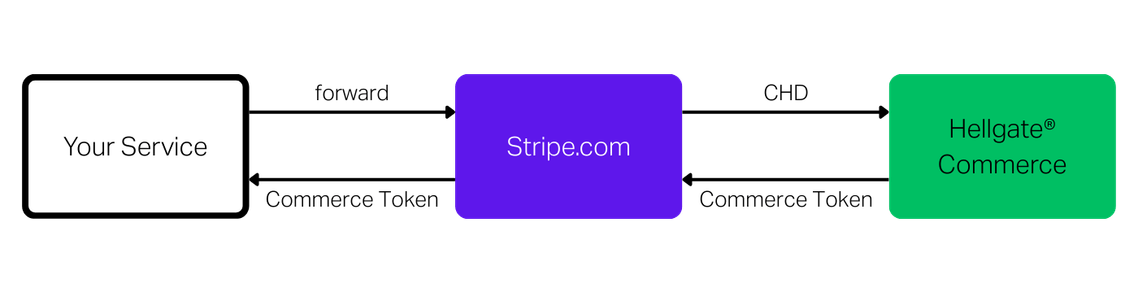
Conceptually, the backup process is a call to the forward API with a reference to a payment method. Stripe.com then forwards the sensitive cardholder data (CHD) to Commerce. Commerce imports the data and returns a Commerce token in exchange; this token is returned by the forward API to the caller.
As the forward API is gated, you need to request access first. Create a Stripe.com support request on your account with the following information:
What do you need help with? Payment APIs
What is your question? I require access to the Vault and Forward API
Tell us more — how can we help? We would like to request access to the Stripe Forward API in order to store payment method information with my vault. We use Commerce as our vault provider. Please find their PCI DSS Attestation of Compliance attached. The destination endpoint is https://api.hellgate.io/cde-import
You will need the PCI DSS Attestation of Compliance from Starfish, which you can get from your account representative.
Option 1 - Selective Backup
To back up only selected payment methods at Stripe.com, trigger the forward API for each payment method.
Request
Replace the placeholders with your actual values:
- STRIPE_API_KEY: Your Stripe.com API key
- STRIPE_PAYMENT_METHOD_ID: The payment-method id from Stripe.com
- COMMERCE_API_KEY: Your Commerce API key
curl -v https://api.stripe.com/v1/forwarding/requests \
-u "STRIPE_API_KEY:" \
-d payment_method="STRIPE_PAYMENT_METHOD_ID" \
--data-urlencode url="https://staging.hellgate.dev/cde-import" \
-d "request[headers][0][name]"=X-API-Key \
-d "request[headers][0][value]"="COMMERCE_API_KEY" \
--data-urlencode "request[body]"='{"metadata":{"business_key":"STRIPE_PAYMENT_METHOD_ID"},"card":{"number":"","exp_month":"","exp_year":"","cvc":"","name":""}}' \
-d "replacements[0]"=card_number \
-d "replacements[1]"=card_expiry \
-d "replacements[2]"=card_cvc \
-d "replacements[3]"=cardholder_name
Response
The response includes the created Commerce token; you can store its ID in your system. If you send the Stripe.com payment-method id as metadata, you can trace the token back via the business_key attribute.
{
"id": "5d6b2c9a-9b0b-4b0c-8c7d-9e9d5d7e9d5d",
"business_key": "STRIPE_PAYMENT_METHOD_ID",
"cardholder_name": "John Doe",
"created_at": "2023-10-01T00:00:00Z",
"expiry_month": 4,
"expiry_year": 2033,
"masked_account_number": "424242******4242",
"scheme": "VISA"
}
Option 2 - Automatic Sync
To synchronize the entire payment-method set from Stripe.com to Commerce, use the import automation service. It triggers the forward API on your behalf and imports payment methods into Commerce. Depending on volume, the process can take a while.
Inform your Commerce account representative about your import plans so we can allocate the appropriate resources.
Request an import via API. The system processes the request and sends a webhook notification when the import is completed. Commerce stores the original payment-method id (business_key) with each token so you can trace tokens back to their origin.
Create an Import Request
Pass your Stripe.com API key in the request. The key is used only to authenticate to Stripe.com and trigger the forward API; it is not exposed to other systems.
curl -i -X POST \
https://api.hellgate.io/tokens/imports \
-H 'Content-Type: application/json' \
-H 'X-API-KEY: YOUR_COMMERCE_API_KEY' \
-d '{
"provider": "stripe",
"stripe": {
"api_key": "YOUR_STRIPE_API_KEY"
}
}'
The response includes the ID of the import job. Use this ID to track progress by requesting the import status.
Check Import Status
curl -i -X GET \
'https://api.hellgate.io/tokens/imports/{id}' \
-H 'X-API-KEY: YOUR_COMMERCE_API_KEY'
The import starts in state preparing, then changes to running, and finally to finished when completed.
See the API documentation for more details on the import API.