

Installation
The SDK is available on Maven Central. To install the SDK, add the following lines to yourbuild.gradle.kts or respective settings.gradle.kts file.
build.gradle.kts file:
Usage
Initialization of the UI Components
The SDK provides a set of UI components that can be used to collect payment method data from the user. These could look similar to the following image, depending on the design of your application.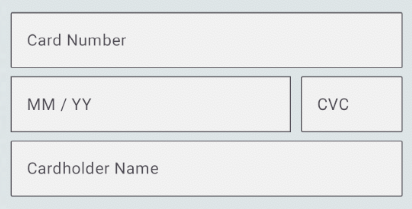
CardNumberField- A class that collects card details from the user.ExpiryDateField- A class that collects the expiry date of the card from the user.CvcNumberField- A class that collects the CVC of the card from the user.
ComposeUI function of the class should be called in your compose UI code to actually draw the fields as part of your user interface. With the onValueChange callback, you can listen to changes in the field state and update your viewModel accordingly.
FieldState
The field state is a data class that holds the state of the field. It contains the following properties and will be updated as the user interacts with the field:Styling
TheComposeUI function allows you to pass in an androidx.compose.material3.TextFieldColors object to style the field and overwrite default colors. If not overridden, the default colors will be used, with the MaterialTheme.colorScheme.error color being used for the error state. The shape parameter allows you to pass in a androidx.compose.ui.graphics.Shape object to style the field and overwrite the default shape. If not overridden, the OutlinedTextFieldDefautls.shape will be used.
CardNumberField
TheCardNumberField class is used to collect the card number from the user. It can be initialized with a label that will be displayed on/above the input field. The following pictures give examples of how the field could look empty / filled and with a Luhn-invalid number.



Code sample
ExpiryDateField
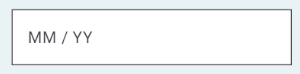
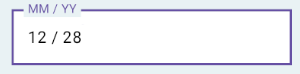
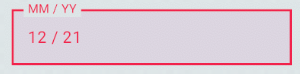
TheExpiryDateField class is used to collect the expiry date of the card from the user. The following pictures give examples of how the field could look empty / filled and with an invalid date.
Code sample
CvcNumberField
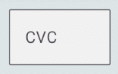
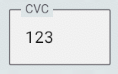
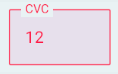
TheCvcNumberField class is used to collect the CVC of the card from the user. The following pictures give examples of how the field could look empty / filled and with an invalid CVC.
Code sample
In case you would like to use theCvcNumberField to also accept CVV (4-digit codes), you will need to pass in the maximum length of the CVC/CVV as a flow according to the card brand you are expecting. This flow can be retrieved from the CardNumberField class, which will try to imply the brand of the card based on the card number. If no flow is provided, the default maximum length of 3 digits will be used.
Additional Fields
The SDK also provides an AdditionalFields class that can be used to collect additional information from the user. The class is initialized with a type of the field and can be used to collect the following types of data:CARDHOLDER_NAME- to collect the cardholder name from the user.
EMAIL- to collect the email from the user.BILLING_ADDRESS_LINE_1- to collect the address details from the user.BILLING_ADDRESS_LINE_2- to collect the address details from the user.BILLING_ADDRESS_LINE_3- to collect the address details from the user.BILLING_ADDRESS_POSTAL_CODE- to collect the address details from the user.BILLING_ADDRESS_CITY- to collect the address details from the user.
Code sample
Tokenization
Once the user has filled in the fields, the data can be tokenized using thetokenizeCard() function of the CardHandler interface.
To create an instance of the CardHandler interface, you can use the cardHandler() function of the Hellgate SDK object. This section
is followed by the SDK-interface for reference. Please make sure to provide the base URL of the Hellgate® API as a parameter according
to your Hellgate® usage scenario. As a second parameter, you will need to provide the session_id that you received from the Hellgate®
API when you initialized the session on the server side.
Once created, you can initialize a Hellgate® Object which helps you to handle a session.
SDK Interface
Code sample
SessionState object which can be used to determine the state of the session. If the session is in the state REQUIRE_TOKENIZATION you can proceed with tokenizing the card data. After the card data was handed in successfully, the session state will change to COMPLETE. To hand in card data please create a card handler object by calling the cardHandler() function of the Hellgate object. Now thetokenizeCard() function can be used to tokenize the card data by handing over the classes of the card number, expiry date and CVC number fields. Also in case you collected additional data, you can hand over a list of DataField objects to the function. The function will return a TokenizeCardResponse object. In case the tokenization was successful, the response will be of type TokenizeCardResponse.Success and contain the ID of the token. In case the tokenization failed, the response will be of type TokenizeCardResponse.Failure and contain a message and an optional throwable.