

This extension is mandatory if you require custom shopper interactions.Contact Hellgate Support to enable it for your account.
Architecture
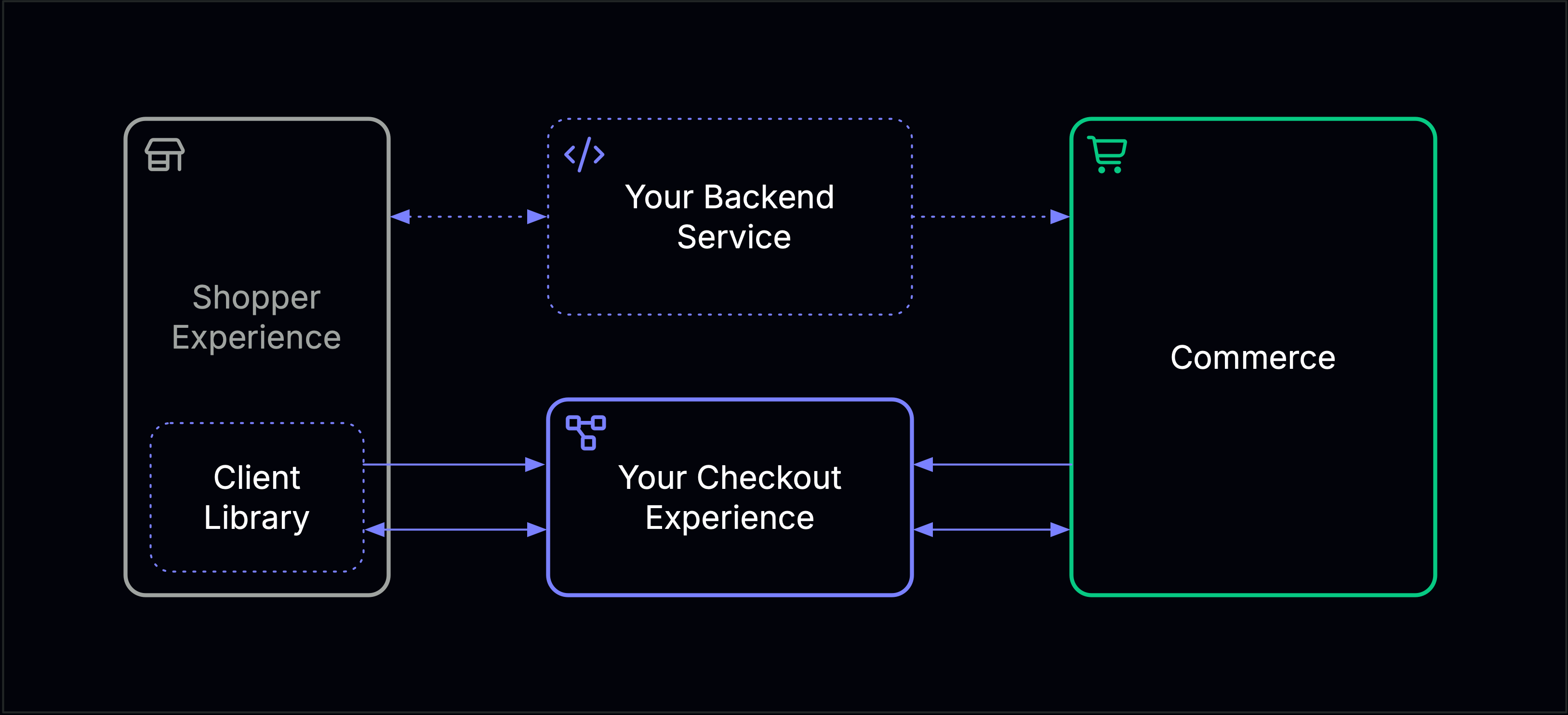
- REST — Commerce calls your service synchronously to open sessions when shopper input is required.
- Cloud Events — Your service and Commerce exchange results asynchronously via the event-bridge.
Payment Session
A Payment Session is triggered when Commerce needs the shopper to provide payment details, such as card credentials. Your service returns asession_key used to initialize the Client Library.
Commerce surfaces the requirement as an ACTION_REQUIRED response:
session_key. Once the shopper submits their card details, your Checkout Experience sends one of these events to Commerce via the event bridge:
CardSessionCreated— shopper successfully submitted card detailsCardSessionFailed— card session could not be completed
3-D Secure Session
A 3-D Secure Session is triggered when a payment requires a 3DS challenge. Your service returns aredirect_url and Commerce instructs your client to redirect the shopper.
Commerce surfaces the requirement as an ACTION_REQUIRED response:
TDSResult event to Commerce via the event bridge. Commerce then confirms the outcome with a CompleteTDSSession event.
See Create 3DS Session for the API reference.
Lifecycle Events from Commerce
Commerce sends these events across both session types to notify you of state changes:SessionVoided— the session was voidedStateChanged— the payment state changed