

High Level architecture
The following illustration highlights the architecture of a Commerce V1 setup.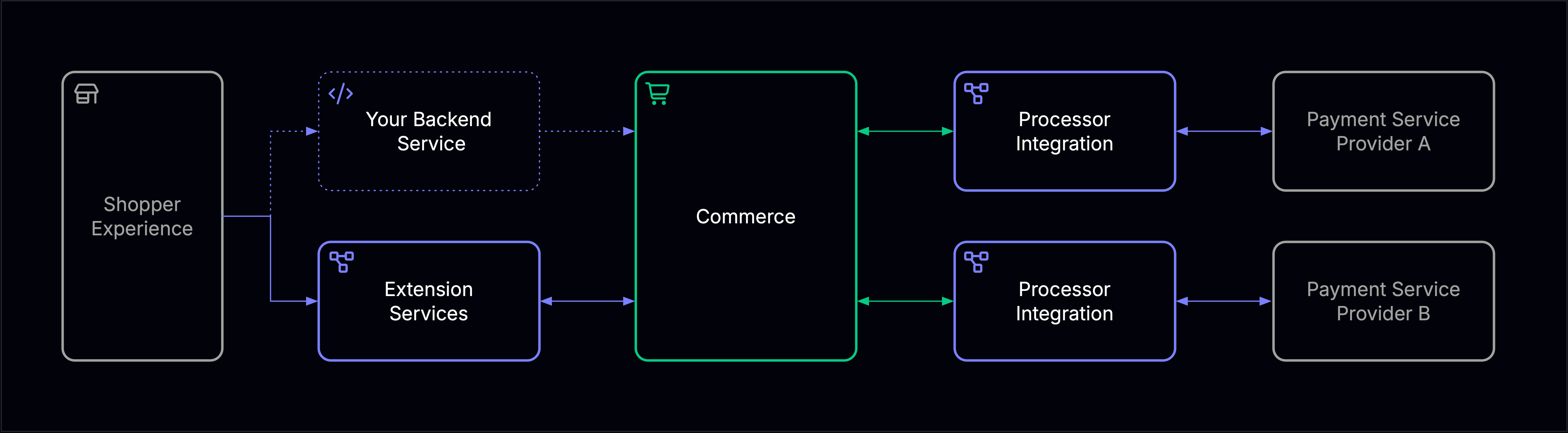
Extension Services
These are extensions used to customize the shopper interactions like for instance the checkout experience and the maintenance of mandate data.
Processor Integration
These are technical services integrating your payment service providers into Commerce V1. They are very light weight and allow you to customize integration behavior to your strategic advantage.
Commerce
The platform provides the payments-kernel and related standard functionality (e.g. one-off payment with split instruction). It is foundational for your extensions but caters for the majority of the functionality.
Interfaces
Commerce V1 offers two primary ways to communicate with the platform: synchronous REST APIs for direct operations and asynchronous Cloud Events for service-to-service communication.REST APIs
Make direct API calls to process payments, manage customer data, and configure your instance. All endpoints use JSON for request and response payloads.
Cloud Events
Asynchronous service-to-service communication using the CloudEvents specification.
Authentication
Commerce V1 supports two authentication methods depending on your integration type.Service-to-Service
Communication between your backend services and the Hellgate platform uses mutual TLS (mTLS) certificates for authentication. This provides cryptographic authentication and encrypted communication between your services and Commerce V1.Your mTLS certificates are provided during instance provisioning. Contact our support if you need to rotate or update your certificates.
Customer-to-Service
In case you want to expose the services of the Hellgate platform to your customers, you can use API keys for authentication. API keys are scoped to specific merchants and can be configured with granular permissions.API keys should be stored securely and never exposed in client-side code. Rotate keys regularly as part of your security best practices.
Migrating from Previous Versions
If you’re migrating from an older version of Commerce, Commerce V1 provides several integration patterns to ease the transition.Event Bridge Service
Deploy the event bridge service to translate Commerce V1 Cloud Events into your existing event format. This allows you to maintain your current event-driven workflows while migrating to Commerce V1. The bridge service:- Handles mTLS authentication for secure connection to Commerce V1
- Subscribes to Commerce V1 Cloud Events
- Transforms events into your legacy format
- Publishes events to your existing message bus or event endpoints
Direct API Integration
Use mTLS certificates to communicate directly with Commerce V1 REST endpoints from your existing services. This approach requires minimal changes to your service architecture.Expose Extension Services
Configure Commerce V1 to call your existing Customer Experience and SEPA signing services. This preserves your current UI flows and compliance processes during migration.Planning a migration? Contact your account representative to discuss migration strategies, data migration support, and timeline planning.