> ## Documentation Index
> Fetch the complete documentation index at: https://developer.hellgate.io/llms.txt
> Use this file to discover all available pages before exploring further.
# Set Up Webhooks
> Create webhooks, understand payloads and retries, and verify authenticity with HMAC.
## Creating a Webhook
In the Commerce product dashboard, under the "Webhooks" section, you can create webhooks to subscribe to available event types.
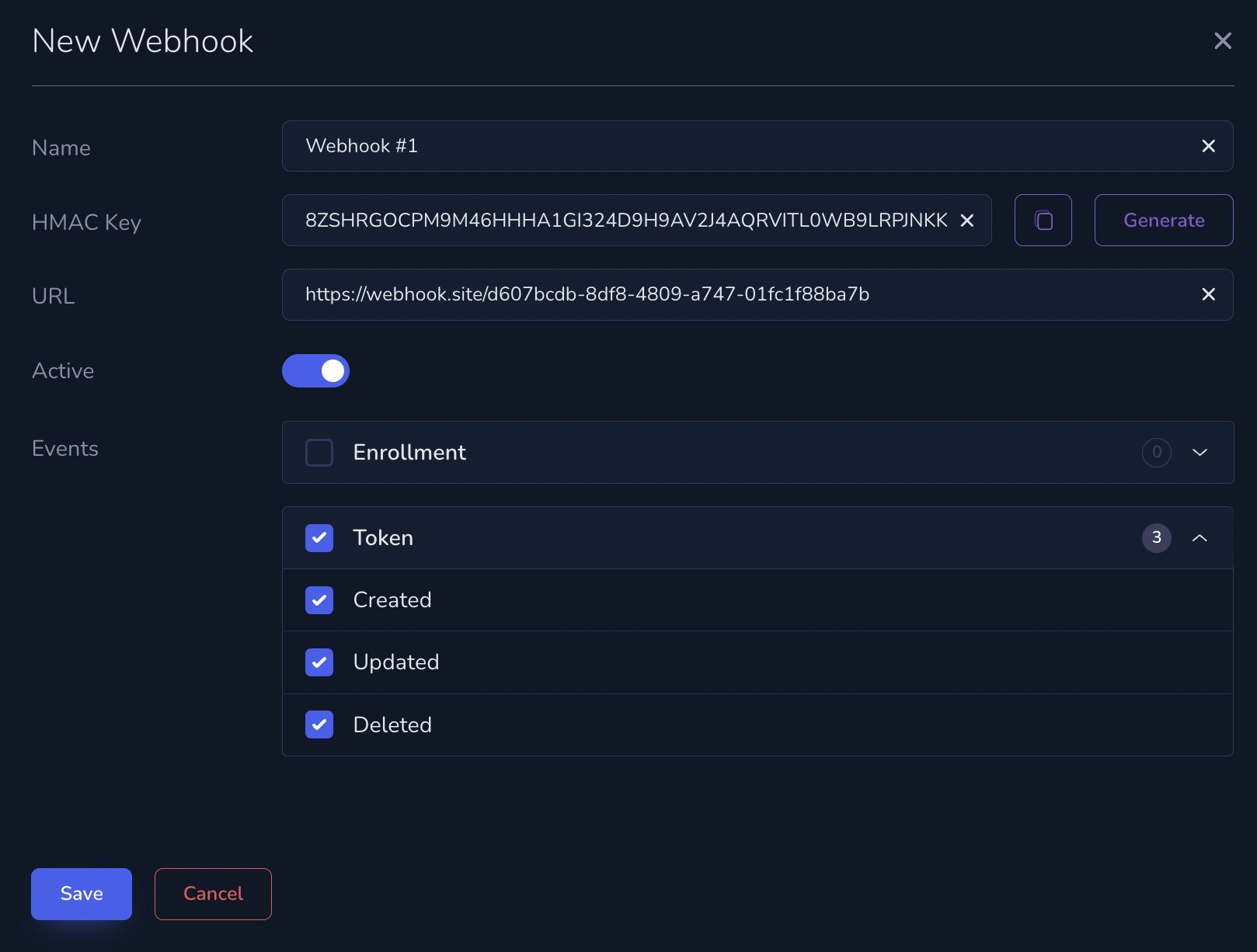 In our [API Documentation](/products/commerce/v2/api-reference/getting-started), certain endpoints include a **Callbacks** section detailing the availability of webhooks.
## Webhook Structure
Each Webhook event includes the following fields:
* `id`: A unique identifier for the event that triggered the notification.
* `created_at`: The timestamp of when the event occurred, formatted in ISO 8601.
* `event_type`: The type of event, as described below in the Events section.
* `object`: The structure of the object varies depending on the event type.
### Example
```json theme={null}
{
"id": "6a757512-44e8-44cd-ad82-f7e9da2f353a",
"created_at": "2024-08-09T09:08:20.809661Z",
"event_type": "token.created",
"token": {
"account_number_last_four": "3490",
"account_number_length": 16,
"authentication_data": {},
"bank_name": "Intl Hdqtrs-Center Owned",
"cardholder_name": "John Doe",
"country_code": "US",
"created_at": "2024-08-09T09:08:20.798263Z",
"expires_at": null,
"expiry_month": 12,
"expiry_year": 2025,
"id": "6a757512-44e8-44cd-ad82-f7e9da2f353a",
"identity_and_verification": "none",
"invalidated_at": null,
"issuer_identification_number": "46229431",
"masked_account_number": "462294XXXXXX3490",
"network_token_status": "pending",
"scheme": "VISA",
"segment": "consumer",
"status": "active",
"supports_device_binding": false,
"type": "debit"
}
}
```
## Retry Strategy
When Commerce sends a notification to your integration server, the server's response determines whether Commerce considers the notification successfully delivered or if it should retry.
* **HTTP 200 (OK)**: Commerce treats this as a successful delivery, and no retries will be made.
* **Any Other HTTP Code**: Commerce considers this a failed delivery attempt and will initiate retries.
**Retry Schedule:** If the server responds with a code other than 200, Commerce will retry the notification immediately. Subsequent retries occur at intervals of 15 seconds, 30 seconds, 60 seconds, and 120 seconds, totaling 5 attempts.
## Verify webhook signatures with HMAC
Verify that webhook events were sent by Commerce and have not been altered in transit by checking the `x-hmac-signature` header.
### HMAC Key
The HMAC key is randomly generated when you create a webhook and consists of a 64-character string that includes digits (1-9) and uppercase letters (A-Z).
### HMAC Signature
The `x-hmac-signature` header is a base16-encoded (hex) Message Authentication Code (MAC) generated from the raw request payload using your HMAC key and SHA256.
### How to verify
1. Calculate the HMAC using:
* The raw payload you received in the webhook body
* Your HMAC key
* The SHA256 hashing function
2. Compare the calculated value with the `x-hmac-signature` header you received.
If they match, the webhook was sent by Commerce and was not modified in transmission.
### Example
Example HMAC key:
```text theme={null}
APJ29CF5LPFXC189YPJT2HX92P0HKVINX63N4TE4WOCUYBT3LKBAQIF25I423DCA
```
Example payload and corresponding `x-hmac-signature`:
```json theme={null}
{
"id": "6a757512-44e8-44cd-ad82-f7e9da2f353a",
"created_at": "2024-08-09T09:08:20.809661Z",
"event_type": "token.created",
"token": {
"account_number_last_four": "3490",
"account_number_length": 16,
"authentication_data": {},
"bank_name": "Intl Hdqtrs-Center Owned",
"card_art_url": null,
"cardholder_name": "John Doe",
"country_code": "US",
"created_at": "2024-08-09T09:08:20.798263Z",
"expires_at": null,
"expiry_month": 12,
"expiry_year": 2025,
"id": "6a757512-44e8-44cd-ad82-f7e9da2f353a",
"identity_and_verification": "none",
"invalidated_at": null,
"issuer_identification_number": "46229431",
"masked_account_number": "462294XXXXXX3490",
"network_token_status": "pending",
"scheme": "VISA",
"segment": "consumer",
"status": "active",
"supports_device_binding": false,
"type": "debit"
}
}
```
`x-hmac-signature` for the above payload:
```text theme={null}
7d2a6ac096d31e4b27c2efc44c0966498007b4aeffdfbb54da55d258911dbaf5
```
Example verification in Node.js:
```javascript theme={null}
const crypto = require('crypto');
function sign(payload, hmacKey) {
const payloadBuffer = Buffer.from(payload, 'utf-8');
const keyBuffer = Buffer.from(hmacKey, 'utf-8');
const hmac = crypto.createHmac('sha256', keyBuffer);
hmac.update(payloadBuffer);
return hmac.digest('hex');
}
// Example usage:
const payload = '{"id":"3be16244-9b33-476d-9cd1-24c6975d2faa",...}';
const hmacKey = 'APJ29CF5LPFXC189YPJT2HX92P0HKVINX63N4TE4WOCUYBT3LKBAQIF25I423DCA';
const signature = sign(payload, hmacKey);
console.log(signature);
```
The computed signature should match the `x-hmac-signature` header. If it does, the webhook is legitimate.
In our [API Documentation](/products/commerce/v2/api-reference/getting-started), certain endpoints include a **Callbacks** section detailing the availability of webhooks.
## Webhook Structure
Each Webhook event includes the following fields:
* `id`: A unique identifier for the event that triggered the notification.
* `created_at`: The timestamp of when the event occurred, formatted in ISO 8601.
* `event_type`: The type of event, as described below in the Events section.
* `object`: The structure of the object varies depending on the event type.
### Example
```json theme={null}
{
"id": "6a757512-44e8-44cd-ad82-f7e9da2f353a",
"created_at": "2024-08-09T09:08:20.809661Z",
"event_type": "token.created",
"token": {
"account_number_last_four": "3490",
"account_number_length": 16,
"authentication_data": {},
"bank_name": "Intl Hdqtrs-Center Owned",
"cardholder_name": "John Doe",
"country_code": "US",
"created_at": "2024-08-09T09:08:20.798263Z",
"expires_at": null,
"expiry_month": 12,
"expiry_year": 2025,
"id": "6a757512-44e8-44cd-ad82-f7e9da2f353a",
"identity_and_verification": "none",
"invalidated_at": null,
"issuer_identification_number": "46229431",
"masked_account_number": "462294XXXXXX3490",
"network_token_status": "pending",
"scheme": "VISA",
"segment": "consumer",
"status": "active",
"supports_device_binding": false,
"type": "debit"
}
}
```
## Retry Strategy
When Commerce sends a notification to your integration server, the server's response determines whether Commerce considers the notification successfully delivered or if it should retry.
* **HTTP 200 (OK)**: Commerce treats this as a successful delivery, and no retries will be made.
* **Any Other HTTP Code**: Commerce considers this a failed delivery attempt and will initiate retries.
**Retry Schedule:** If the server responds with a code other than 200, Commerce will retry the notification immediately. Subsequent retries occur at intervals of 15 seconds, 30 seconds, 60 seconds, and 120 seconds, totaling 5 attempts.
## Verify webhook signatures with HMAC
Verify that webhook events were sent by Commerce and have not been altered in transit by checking the `x-hmac-signature` header.
### HMAC Key
The HMAC key is randomly generated when you create a webhook and consists of a 64-character string that includes digits (1-9) and uppercase letters (A-Z).
### HMAC Signature
The `x-hmac-signature` header is a base16-encoded (hex) Message Authentication Code (MAC) generated from the raw request payload using your HMAC key and SHA256.
### How to verify
1. Calculate the HMAC using:
* The raw payload you received in the webhook body
* Your HMAC key
* The SHA256 hashing function
2. Compare the calculated value with the `x-hmac-signature` header you received.
If they match, the webhook was sent by Commerce and was not modified in transmission.
### Example
Example HMAC key:
```text theme={null}
APJ29CF5LPFXC189YPJT2HX92P0HKVINX63N4TE4WOCUYBT3LKBAQIF25I423DCA
```
Example payload and corresponding `x-hmac-signature`:
```json theme={null}
{
"id": "6a757512-44e8-44cd-ad82-f7e9da2f353a",
"created_at": "2024-08-09T09:08:20.809661Z",
"event_type": "token.created",
"token": {
"account_number_last_four": "3490",
"account_number_length": 16,
"authentication_data": {},
"bank_name": "Intl Hdqtrs-Center Owned",
"card_art_url": null,
"cardholder_name": "John Doe",
"country_code": "US",
"created_at": "2024-08-09T09:08:20.798263Z",
"expires_at": null,
"expiry_month": 12,
"expiry_year": 2025,
"id": "6a757512-44e8-44cd-ad82-f7e9da2f353a",
"identity_and_verification": "none",
"invalidated_at": null,
"issuer_identification_number": "46229431",
"masked_account_number": "462294XXXXXX3490",
"network_token_status": "pending",
"scheme": "VISA",
"segment": "consumer",
"status": "active",
"supports_device_binding": false,
"type": "debit"
}
}
```
`x-hmac-signature` for the above payload:
```text theme={null}
7d2a6ac096d31e4b27c2efc44c0966498007b4aeffdfbb54da55d258911dbaf5
```
Example verification in Node.js:
```javascript theme={null}
const crypto = require('crypto');
function sign(payload, hmacKey) {
const payloadBuffer = Buffer.from(payload, 'utf-8');
const keyBuffer = Buffer.from(hmacKey, 'utf-8');
const hmac = crypto.createHmac('sha256', keyBuffer);
hmac.update(payloadBuffer);
return hmac.digest('hex');
}
// Example usage:
const payload = '{"id":"3be16244-9b33-476d-9cd1-24c6975d2faa",...}';
const hmacKey = 'APJ29CF5LPFXC189YPJT2HX92P0HKVINX63N4TE4WOCUYBT3LKBAQIF25I423DCA';
const signature = sign(payload, hmacKey);
console.log(signature);
```
The computed signature should match the `x-hmac-signature` header. If it does, the webhook is legitimate.