> ## Documentation Index
> Fetch the complete documentation index at: https://developer.hellgate.io/llms.txt
> Use this file to discover all available pages before exploring further.
# Forward Sensitive Data
> Forward sensitive payment data securely using the compliance proxy
## Overview
Commerce provides a secure and efficient mechanism for forwarding sensitive payment data to Payment Service Providers (PSPs). By leveraging built-in data protection features, Commerce ensures that sensitive information is handled securely and in compliance with industry standards (PCI DSS).
## Data Flow
The core component supporting these forwards is the compliance proxy. This proxy operates transparently between the merchant systems and the destination system to which data is sent.
The basic interaction involves a request that a Merchant Server intends to send to a PSP. When this request contains sensitive information (such as a primary account number within the scope of PCI DSS), the merchant's service must adhere to compliance requirements.
Commerce provides an integrated compliance solution by securely storing sensitive information in a token store (also referred to as Vault). This enables the merchant to handle non-sensitive data, represented as tokens. These tokens are given as UUID (RFC 9562 - Version 4) within Commerce.
To accommodate any structure of the JSON request, the integrator specifies through placeholders where Commerce should inject the sensitive information retrieved from the secure payment data store.
The complete data flow of the process is illustrated in the following diagram:
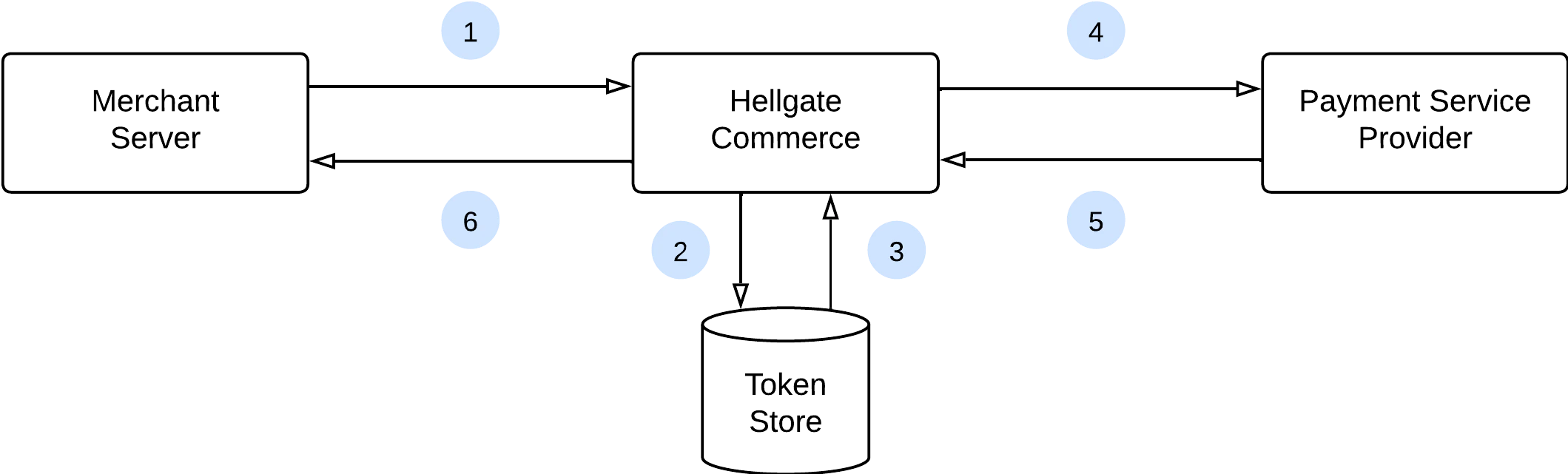
 1. The merchant server sends the payload to Commerce, including placeholders for sensitive information and the token ID.
2. Commerce retrieves the sensitive information corresponding to the token ID.
3. Commerce injects the sensitive information at the positions indicated by the placeholders.
4. Commerce forwards the processed data to the specified payment service provider.
5. The payment service provider processes the request and returns a response to Commerce.
6. Commerce relays the response back to the merchant server.
## Placeholders and Filters
To correctly inject sensitive information into requests, placeholders must be defined within the payload. These placeholders are replaced with the actual sensitive data at runtime.
Consider a merchant sending a credit card payment request to an acquirer with the following basic structure:
```json theme={null}
{
"creditCard": {
"number": "4242424242424242",
"expiration_month": "12",
"expiration_year": "2030"
}
}
```
```http theme={null}
creditCard[number]=4242424242424242 &
creditCard[expiration_month]=12 &
creditCard[expiration_year]=2030
```
The attribute `$.creditCard.number` represents the credit card number and is considered sensitive under PCI DSS.
### Placeholder Syntax
Placeholders are defined using a specific syntax, for example:
```json theme={null}
{
"creditCard": {
"number": "{{ account_number }}",
"expiration_month": "{{ expiration_month }}",
"expiration_year": "{{ expiration_year }}"
}
}
```
```http theme={null}
creditCard[number]={{ account_number }} &
creditCard[expiration_month]={{ expiration_month }} &
creditCard[expiration_year]={{ expiration_year }}
```
The actual value of the attribute is injected at the location indicated by the placeholder. Please refer to the documentation of the forwarding endpoint to learn more about the attributes which are available as placeholders.
### Filters
| Filter | Description |
| :-------- | :--------------------------------------------------------------------------------------------------------------------- |
| `tail(n)` | Extracts the last `n` characters of the attribute. Returns always a string, even if the placeholder is of number type. |
| `unwrap` | Does not convert a number type into a string, respectively just returns the string on a string type. |
#### Tail Filter
If the payment request requires a modified format—such as only the last two digits of the expiration year and numeric types for both year and month—the following structure applies:
```json theme={null}
{
"creditCard": {
"number": "4242424242424242",
"expiration_month": "12",
"expiration_year": "30"
}
}
```
```http theme={null}
creditCard[number]=4242424242424242 &
creditCard[expiration_month]=12 &
creditCard[expiration_year]=30
```
This necessitates the application of filters to the injected data. The corresponding request with placeholders and filters appears as follows:
```json theme={null}
{
"creditCard": {
"number": "{{ account_number }}",
"expiration_month": "{{ expiration_month }}",
"expiration_year": "{{ expiration_year | tail(2) }}"
}
}
```
```http theme={null}
creditCard[number]={{ account_number }} &
creditCard[expiration_month]={{ expiration_month }} &
creditCard[expiration_year]={{ expiration_year | tail(2) }}
```
#### Unwrap Filter
The `unwrap` filter allows to convert attributes of type number.
```json theme={null}
{
"creditCard": {
"number": "{{ account_number }}",
"expiration_month": "{{ expiration_month | unwrap }}",
"expiration_year": "{{ expiration_year | unwrap }}"
}
}
```
The filter `unwrap` does not work in this encoding, as `application/x-www-form-urlencoded` does not support number types.
```http theme={null}
creditCard[number]={{ account_number }} &
creditCard[expiration_month]={{ expiration_month }} &
creditCard[expiration_year]={{ expiration_year }}
```
```json theme={null}
{
"creditCard": {
"number": "4242424242424242",
"expiration_month": 12,
"expiration_year": 2030
}
}
```
```http theme={null}
creditCard[number]=4242424242424242 &
creditCard[expiration_month]=12 &
creditCard[expiration_year]=2030
```
## HTTP Headers
The compliance proxy not only forwards the payload, but also HTTP headers.
### Standard Forward
Commerce forwards all custom headers which are sent into the forward request to the destination. Custom headers in this definition are all headers which are not explicitly reserved by Commerce (for instance `x-api-key`) or by the forwarding endpoint. Please refer to the specific documentation in the API reference for more details.
Returned headers from the PSP are passed back in the same way to the caller.
### Header Overwrites
Required headers of the forwarding endpoint cannot be used by the caller of the proxy. Commerce offers a way to still use these headers with the PSP, by combining two headers. One header defines the name of the header to be forwarded (the name which conflicts with Commerce requirements) and the other defines the corresponding value. The two headers must follow this naming convention to be combined:
| Type | Pattern |
| :--------------- | :-------------------------- |
| Name Definition | `x-[own-header-name]-name` |
| Value Definition | `x-[own-header-name]-value` |
Considering this request to Commerce, the conflict on the header `x-api-key` is resolved.
```bash theme={null}
curl --location 'https://sandbox.hellgate.io/forward' \
--header 'x-api-key: hlg-sbx-9876...' \
--header 'x-my-authentication-name: x-api-key' \
--header 'x-my-authentication-value: 123456' \
...
```
The forwarded call to the PSP will contain the header `x-api-key` with the value `123456`.
1. The merchant server sends the payload to Commerce, including placeholders for sensitive information and the token ID.
2. Commerce retrieves the sensitive information corresponding to the token ID.
3. Commerce injects the sensitive information at the positions indicated by the placeholders.
4. Commerce forwards the processed data to the specified payment service provider.
5. The payment service provider processes the request and returns a response to Commerce.
6. Commerce relays the response back to the merchant server.
## Placeholders and Filters
To correctly inject sensitive information into requests, placeholders must be defined within the payload. These placeholders are replaced with the actual sensitive data at runtime.
Consider a merchant sending a credit card payment request to an acquirer with the following basic structure:
```json theme={null}
{
"creditCard": {
"number": "4242424242424242",
"expiration_month": "12",
"expiration_year": "2030"
}
}
```
```http theme={null}
creditCard[number]=4242424242424242 &
creditCard[expiration_month]=12 &
creditCard[expiration_year]=2030
```
The attribute `$.creditCard.number` represents the credit card number and is considered sensitive under PCI DSS.
### Placeholder Syntax
Placeholders are defined using a specific syntax, for example:
```json theme={null}
{
"creditCard": {
"number": "{{ account_number }}",
"expiration_month": "{{ expiration_month }}",
"expiration_year": "{{ expiration_year }}"
}
}
```
```http theme={null}
creditCard[number]={{ account_number }} &
creditCard[expiration_month]={{ expiration_month }} &
creditCard[expiration_year]={{ expiration_year }}
```
The actual value of the attribute is injected at the location indicated by the placeholder. Please refer to the documentation of the forwarding endpoint to learn more about the attributes which are available as placeholders.
### Filters
| Filter | Description |
| :-------- | :--------------------------------------------------------------------------------------------------------------------- |
| `tail(n)` | Extracts the last `n` characters of the attribute. Returns always a string, even if the placeholder is of number type. |
| `unwrap` | Does not convert a number type into a string, respectively just returns the string on a string type. |
#### Tail Filter
If the payment request requires a modified format—such as only the last two digits of the expiration year and numeric types for both year and month—the following structure applies:
```json theme={null}
{
"creditCard": {
"number": "4242424242424242",
"expiration_month": "12",
"expiration_year": "30"
}
}
```
```http theme={null}
creditCard[number]=4242424242424242 &
creditCard[expiration_month]=12 &
creditCard[expiration_year]=30
```
This necessitates the application of filters to the injected data. The corresponding request with placeholders and filters appears as follows:
```json theme={null}
{
"creditCard": {
"number": "{{ account_number }}",
"expiration_month": "{{ expiration_month }}",
"expiration_year": "{{ expiration_year | tail(2) }}"
}
}
```
```http theme={null}
creditCard[number]={{ account_number }} &
creditCard[expiration_month]={{ expiration_month }} &
creditCard[expiration_year]={{ expiration_year | tail(2) }}
```
#### Unwrap Filter
The `unwrap` filter allows to convert attributes of type number.
```json theme={null}
{
"creditCard": {
"number": "{{ account_number }}",
"expiration_month": "{{ expiration_month | unwrap }}",
"expiration_year": "{{ expiration_year | unwrap }}"
}
}
```
The filter `unwrap` does not work in this encoding, as `application/x-www-form-urlencoded` does not support number types.
```http theme={null}
creditCard[number]={{ account_number }} &
creditCard[expiration_month]={{ expiration_month }} &
creditCard[expiration_year]={{ expiration_year }}
```
```json theme={null}
{
"creditCard": {
"number": "4242424242424242",
"expiration_month": 12,
"expiration_year": 2030
}
}
```
```http theme={null}
creditCard[number]=4242424242424242 &
creditCard[expiration_month]=12 &
creditCard[expiration_year]=2030
```
## HTTP Headers
The compliance proxy not only forwards the payload, but also HTTP headers.
### Standard Forward
Commerce forwards all custom headers which are sent into the forward request to the destination. Custom headers in this definition are all headers which are not explicitly reserved by Commerce (for instance `x-api-key`) or by the forwarding endpoint. Please refer to the specific documentation in the API reference for more details.
Returned headers from the PSP are passed back in the same way to the caller.
### Header Overwrites
Required headers of the forwarding endpoint cannot be used by the caller of the proxy. Commerce offers a way to still use these headers with the PSP, by combining two headers. One header defines the name of the header to be forwarded (the name which conflicts with Commerce requirements) and the other defines the corresponding value. The two headers must follow this naming convention to be combined:
| Type | Pattern |
| :--------------- | :-------------------------- |
| Name Definition | `x-[own-header-name]-name` |
| Value Definition | `x-[own-header-name]-value` |
Considering this request to Commerce, the conflict on the header `x-api-key` is resolved.
```bash theme={null}
curl --location 'https://sandbox.hellgate.io/forward' \
--header 'x-api-key: hlg-sbx-9876...' \
--header 'x-my-authentication-name: x-api-key' \
--header 'x-my-authentication-value: 123456' \
...
```
The forwarded call to the PSP will contain the header `x-api-key` with the value `123456`.