> ## Documentation Index
> Fetch the complete documentation index at: https://developer.hellgate.io/llms.txt
> Use this file to discover all available pages before exploring further.
# Processor Integration
> Build lightweight microservices that translate Commerce V1 payment flows into processor-specific operations.
Processor integrations are microservices you build and host to handle atomic payment transactions within a Commerce V1 flow. When the flow reaches a transaction node, Commerce dispatches a CloudEvent to your integration. Your service coordinates with the third-party processor and reports the result back.
This keeps Commerce flow-agnostic while giving you full control over processor-specific logic — including custom business rules such as checking seller balances before initiating a marketplace transfer.
 ## How it works
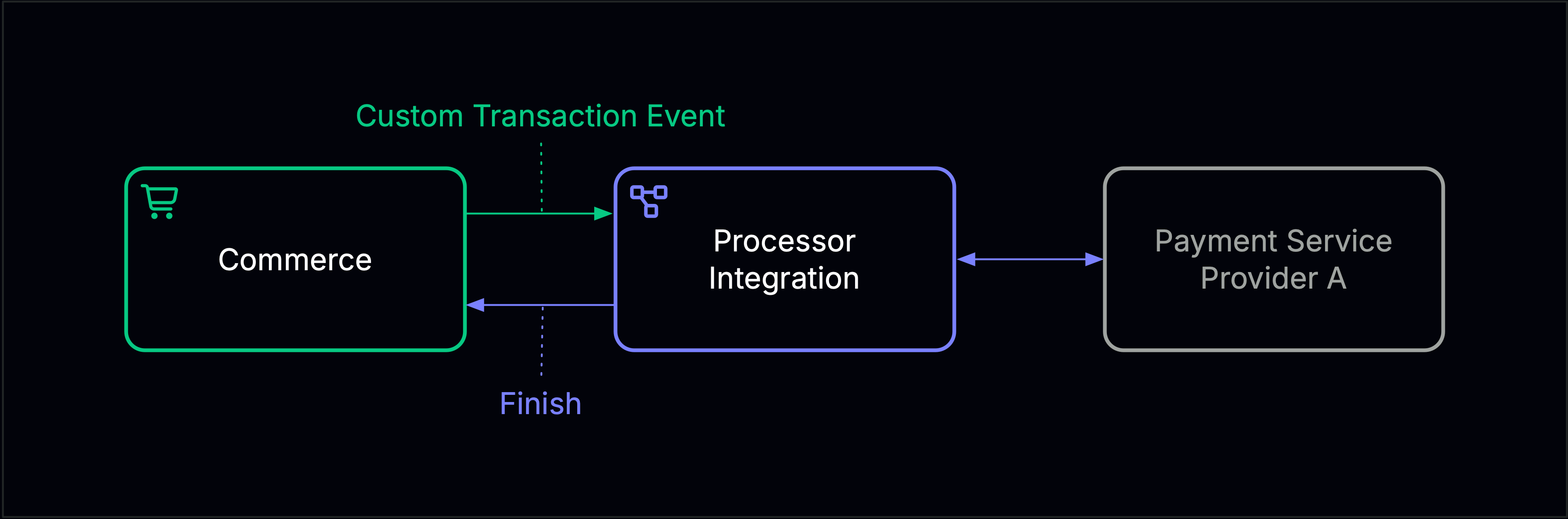
Commerce sends a start event when the flow reaches a transaction node. The `ce-type` matches the value configured in that node — this is how your integration identifies which operation to perform. Once the transaction is complete, your integration sends a `Finish` event and Commerce routes the flow based on the result.
See [Flow Configuration](/products/commerce/v1/integration/processors/flow-configuration) for transaction node configuration.
## Events
Commerce sends a [Custom Transaction Event](/products/commerce/v1/eventing-reference/outbound/custom-transaction-event) when the flow reaches a transaction node. Once processing is complete, your integration sends a [`Finish`](/products/commerce/v1/eventing-reference/inbound/finish) event and Commerce routes the flow based on the `result` value.
## How it works
Commerce sends a start event when the flow reaches a transaction node. The `ce-type` matches the value configured in that node — this is how your integration identifies which operation to perform. Once the transaction is complete, your integration sends a `Finish` event and Commerce routes the flow based on the result.
See [Flow Configuration](/products/commerce/v1/integration/processors/flow-configuration) for transaction node configuration.
## Events
Commerce sends a [Custom Transaction Event](/products/commerce/v1/eventing-reference/outbound/custom-transaction-event) when the flow reaches a transaction node. Once processing is complete, your integration sends a [`Finish`](/products/commerce/v1/eventing-reference/inbound/finish) event and Commerce routes the flow based on the `result` value.