> ## Documentation Index
> Fetch the complete documentation index at: https://developer.hellgate.io/llms.txt
> Use this file to discover all available pages before exploring further.
# Overview
> Build and host your own checkout experience to handle shopper interactions during payment flows.
The Checkout Experience extension lets you control how shoppers interact during payment — from collecting card credentials to completing 3-D Secure challenges. Commerce delegates these interactions to your service and routes the shopper accordingly.
This extension is mandatory if you require custom shopper interactions.
Contact Hellgate Support to enable it for your account.
## Architecture
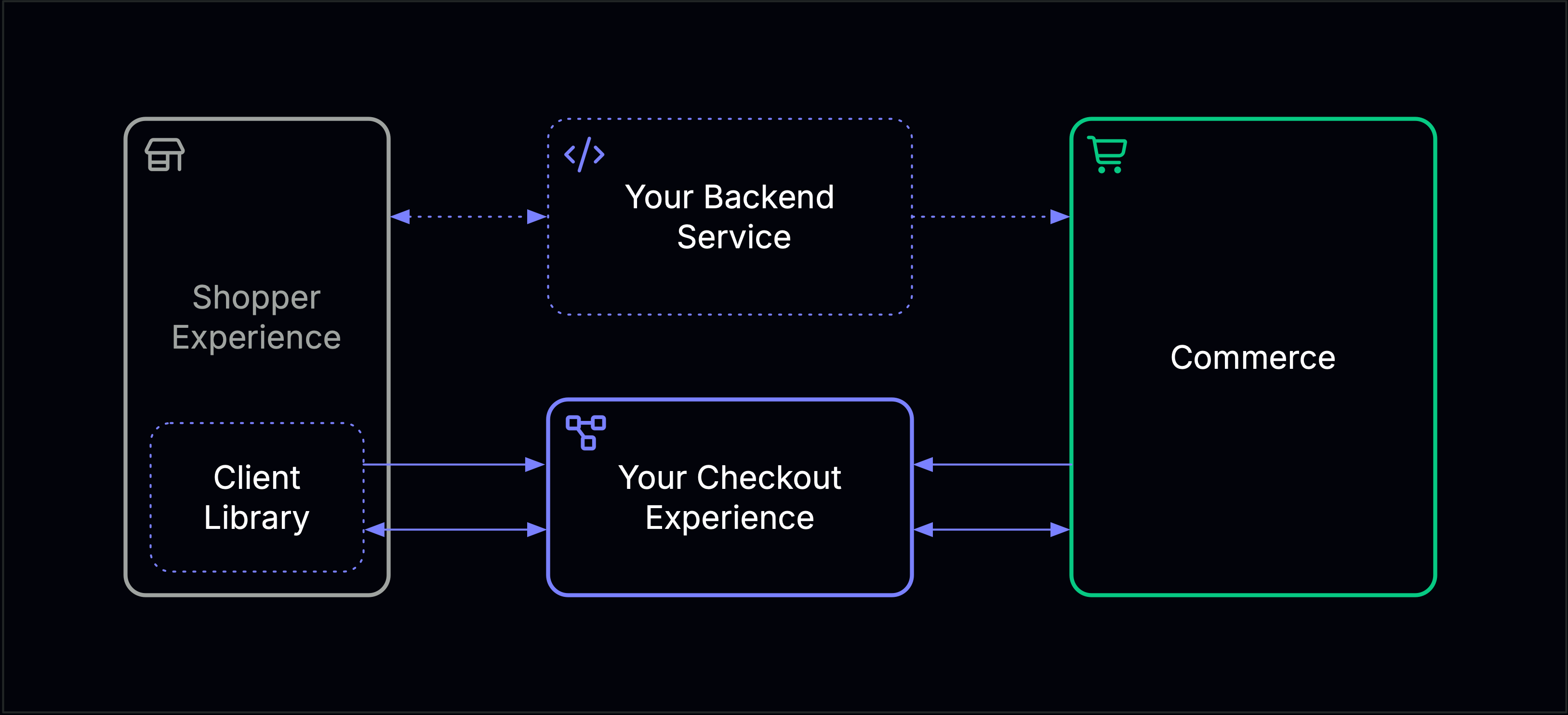 Your Checkout Experience service sits between Commerce and the shopper's client. Two channels connect the components:
* **REST** — Commerce calls your service synchronously to open sessions when shopper input is required.
* **Cloud Events** — Your service and Commerce exchange results asynchronously via the event-bridge.
## Payment Session
A Payment Session is triggered when Commerce needs the shopper to provide payment details, such as card credentials. Your service returns a `session_key` used to initialize the Client Library.
```mermaid theme={null}
sequenceDiagram
autonumber
participant CX as Your Checkout Experience
participant Commerce
Commerce->>+CX: POST /sessions (Payment Session)
CX->>-Commerce: 201 { session_key }
Commerce-->>Commerce: Return ACTION_REQUIRED to caller
Note over CX,Commerce: Awaiting CardSessionCreated or CardSessionFailed
CX->>Commerce: CardSessionCreated CloudEvent
Commerce-->>Commerce: Payment processing resumes
```
Commerce surfaces the requirement as an `ACTION_REQUIRED` response:
```json theme={null}
{
"processing": {
"status": "ACTION_REQUIRED",
"requirement": {
"action": "SET_PAYMENT_METHOD",
"message": "Please set the payment method.",
"options": [
{
"library": "CHECKOUT_EXPERIENCE",
"message": "Initialize the library with this key.",
"session_key": ""
}
]
}
}
}
```
Initialize the Client Library with the `session_key`. Once the shopper submits their card details, your Checkout Experience sends one of these events to Commerce via the event bridge:
* [`CardSessionCreated`](/products/commerce/v1/eventing-reference/inbound/card-session-created) — shopper successfully submitted card details
* [`CardSessionFailed`](/products/commerce/v1/eventing-reference/inbound/card-session-failed) — card session could not be completed
See [Create Session](/products/commerce/v1/extensions/checkout_experience/create-session) for the API reference.
## 3-D Secure Session
A 3-D Secure Session is triggered when a payment requires a 3DS challenge. Your service returns a `redirect_url` and Commerce instructs your client to redirect the shopper.
```mermaid theme={null}
sequenceDiagram
autonumber
participant CX as Your Checkout Experience
participant Commerce
Commerce->>+CX: POST /sessions (3DS Session)
CX->>-Commerce: 201 { redirect_url }
Commerce-->>Commerce: Return ACTION_REQUIRED to caller
Note over CX,Commerce: Awaiting TDSResult
CX->>Commerce: TDSResult CloudEvent
Commerce->>CX: CompleteTDSSession CloudEvent
Commerce-->>Commerce: Payment processing resumes
```
Commerce surfaces the requirement as an `ACTION_REQUIRED` response:
```json theme={null}
{
"processing": {
"status": "ACTION_REQUIRED",
"requirement": {
"action": "REDIRECT",
"options": [
{ "url": "https://3ds.processor.example.com/session/abc123" }
]
}
}
}
```
Redirect the shopper to the provided URL. After the challenge completes, send a [`TDSResult`](/products/commerce/v1/eventing-reference/inbound/tds-result) event to Commerce via the event bridge. Commerce then confirms the outcome with a [`CompleteTDSSession`](/products/commerce/v1/eventing-reference/outbound/complete-tds-session) event.
See [Create 3DS Session](/products/commerce/v1/extensions/checkout_experience/create-3ds-session) for the API reference.
## Lifecycle Events from Commerce
Commerce sends these events across both session types to notify you of state changes:
* [`SessionVoided`](/products/commerce/v1/eventing-reference/outbound/session-voided) — the session was voided
* [`StateChanged`](/products/commerce/v1/eventing-reference/outbound/state-changed) — the payment state changed
Your Checkout Experience service sits between Commerce and the shopper's client. Two channels connect the components:
* **REST** — Commerce calls your service synchronously to open sessions when shopper input is required.
* **Cloud Events** — Your service and Commerce exchange results asynchronously via the event-bridge.
## Payment Session
A Payment Session is triggered when Commerce needs the shopper to provide payment details, such as card credentials. Your service returns a `session_key` used to initialize the Client Library.
```mermaid theme={null}
sequenceDiagram
autonumber
participant CX as Your Checkout Experience
participant Commerce
Commerce->>+CX: POST /sessions (Payment Session)
CX->>-Commerce: 201 { session_key }
Commerce-->>Commerce: Return ACTION_REQUIRED to caller
Note over CX,Commerce: Awaiting CardSessionCreated or CardSessionFailed
CX->>Commerce: CardSessionCreated CloudEvent
Commerce-->>Commerce: Payment processing resumes
```
Commerce surfaces the requirement as an `ACTION_REQUIRED` response:
```json theme={null}
{
"processing": {
"status": "ACTION_REQUIRED",
"requirement": {
"action": "SET_PAYMENT_METHOD",
"message": "Please set the payment method.",
"options": [
{
"library": "CHECKOUT_EXPERIENCE",
"message": "Initialize the library with this key.",
"session_key": ""
}
]
}
}
}
```
Initialize the Client Library with the `session_key`. Once the shopper submits their card details, your Checkout Experience sends one of these events to Commerce via the event bridge:
* [`CardSessionCreated`](/products/commerce/v1/eventing-reference/inbound/card-session-created) — shopper successfully submitted card details
* [`CardSessionFailed`](/products/commerce/v1/eventing-reference/inbound/card-session-failed) — card session could not be completed
See [Create Session](/products/commerce/v1/extensions/checkout_experience/create-session) for the API reference.
## 3-D Secure Session
A 3-D Secure Session is triggered when a payment requires a 3DS challenge. Your service returns a `redirect_url` and Commerce instructs your client to redirect the shopper.
```mermaid theme={null}
sequenceDiagram
autonumber
participant CX as Your Checkout Experience
participant Commerce
Commerce->>+CX: POST /sessions (3DS Session)
CX->>-Commerce: 201 { redirect_url }
Commerce-->>Commerce: Return ACTION_REQUIRED to caller
Note over CX,Commerce: Awaiting TDSResult
CX->>Commerce: TDSResult CloudEvent
Commerce->>CX: CompleteTDSSession CloudEvent
Commerce-->>Commerce: Payment processing resumes
```
Commerce surfaces the requirement as an `ACTION_REQUIRED` response:
```json theme={null}
{
"processing": {
"status": "ACTION_REQUIRED",
"requirement": {
"action": "REDIRECT",
"options": [
{ "url": "https://3ds.processor.example.com/session/abc123" }
]
}
}
}
```
Redirect the shopper to the provided URL. After the challenge completes, send a [`TDSResult`](/products/commerce/v1/eventing-reference/inbound/tds-result) event to Commerce via the event bridge. Commerce then confirms the outcome with a [`CompleteTDSSession`](/products/commerce/v1/eventing-reference/outbound/complete-tds-session) event.
See [Create 3DS Session](/products/commerce/v1/extensions/checkout_experience/create-3ds-session) for the API reference.
## Lifecycle Events from Commerce
Commerce sends these events across both session types to notify you of state changes:
* [`SessionVoided`](/products/commerce/v1/eventing-reference/outbound/session-voided) — the session was voided
* [`StateChanged`](/products/commerce/v1/eventing-reference/outbound/state-changed) — the payment state changed