> ## Documentation Index
> Fetch the complete documentation index at: https://developer.hellgate.io/llms.txt
> Use this file to discover all available pages before exploring further.
# iOS SDK
The iOS SDK enables you to capture credit card data, additional personal data, and process them to create a Hellgate® Token. This token can then be used to process payments with the Hellgate® API.
The SDK is written in Swift and is available as an iOS dependency. It aims to provide a set of UI components and helpers that can be used to collect payment method data from the user with ease.
## Installation[](#installation "Direct link to Installation")
Installation can be done in a number of ways. Pick the distribution method that best suits your project:
### Cocoapods[](#cocoapods "Direct link to Cocoapods")
The SDK is available on [Cocoapods](https://cocoapods.org/pods/Hellgate-iOS-SDK). Add the following line to your `Podfile`:
```ruby theme={null}
pod 'Hellgate-iOS-SDK'
```
### Carthage[](#carthage "Direct link to Carthage")
1. Add the following line to your `Cartfile`:
```ruby theme={null}
github "starfish-codes/hgate2-ios-headless-sdk"
```
2. Run in same directory as your `Cartfile`:
```bash theme={null}
carthage update --use-xcframeworks
```
3. Add the built XCFrameworks to your project under "Frameworks and Libraries"
### Swift Package Manager[](#swift-package-manager "Direct link to Swift Package Manager")
The SDK is available on [Swift Package Index](https://swiftpackageindex.com/starfish-codes/hgate2-ios-headless-sdk). Add the package via Xcode from `https://github.com/starfish-codes/hgate2-ios-headless-sdk.git`
## Usage[](#usage "Direct link to Usage")
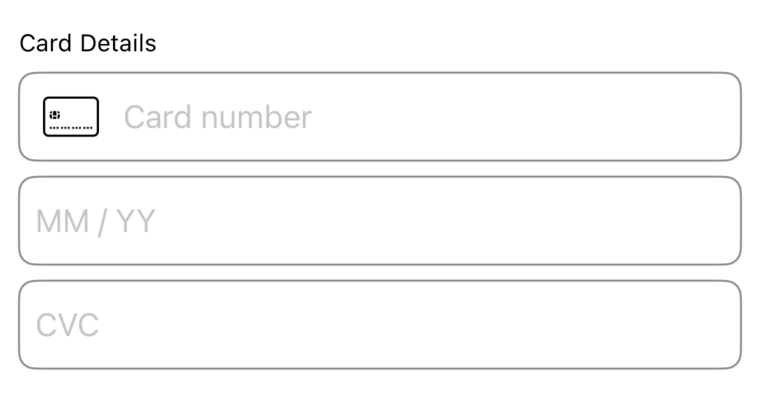
The SDK provides a set of UI components that can be used to collect payment method data from the user.
The components are composed of the following separate fields:
* `CardNumberView` - A View that collects card details from the user.
* `ExpiryDateView` - A View that collects the expiry date of the card from the user.
* `CvcView`- A View that collects the CVC of the card from the user.
First you'll need to import the project:
```swift theme={null}
import Hellgate_iOS_SDK
```
### User Interface[](#user-interface "Direct link to User Interface")
#### Initialization of the UI Components[](#initialization-of-the-ui-components "Direct link to Initialization of the UI Components")
These components are intended to be used in a SwiftUI project. The validity of the users entered data can be listened in on by creating a `@State` property on your parent view.
 #### ViewState[](#viewstate "Direct link to ViewState")
Each view below requires a binding to a `ViewState` property. The `ViewState` of each component is updated as soon as their related component changes.
##### SDK Interface[](#sdk-interface "Direct link to SDK Interface")
```swift theme={null}
public enum ComponentState: String {
case complete
case incomplete
case blank
case invalid
}
public struct ViewState {
public let state: ComponentState
}
```
##### Code Sample[](#code-sample "Direct link to Code Sample")
```swift theme={null}
struct ContentView: View {
@State var cardNumberViewState = ViewState(state: .blank)
@State var expiryViewState = ViewState(state: .blank)
@State var cvcViewState = ViewState(state: .blank)
// ...
}
```
#### CardNumberView[](#cardnumberview "Direct link to CardNumberView")
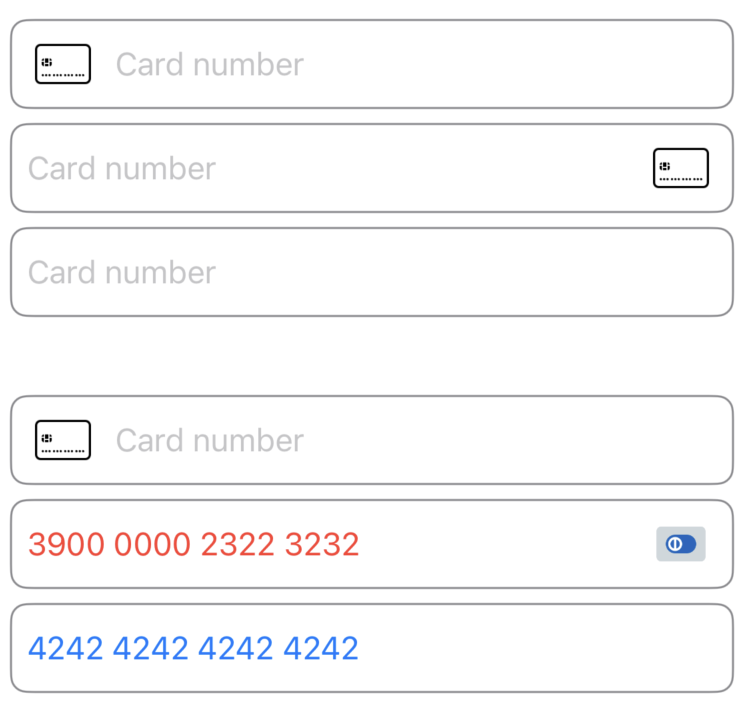
The `CardNumberView` view is used to collect the card number from the user. It can be initialized with the card brand image either on the leading or trailing side of the input or hidden.
#### ViewState[](#viewstate "Direct link to ViewState")
Each view below requires a binding to a `ViewState` property. The `ViewState` of each component is updated as soon as their related component changes.
##### SDK Interface[](#sdk-interface "Direct link to SDK Interface")
```swift theme={null}
public enum ComponentState: String {
case complete
case incomplete
case blank
case invalid
}
public struct ViewState {
public let state: ComponentState
}
```
##### Code Sample[](#code-sample "Direct link to Code Sample")
```swift theme={null}
struct ContentView: View {
@State var cardNumberViewState = ViewState(state: .blank)
@State var expiryViewState = ViewState(state: .blank)
@State var cvcViewState = ViewState(state: .blank)
// ...
}
```
#### CardNumberView[](#cardnumberview "Direct link to CardNumberView")
The `CardNumberView` view is used to collect the card number from the user. It can be initialized with the card brand image either on the leading or trailing side of the input or hidden.
 ##### Code Sample[](#code-sample-1 "Direct link to Code Sample")
```swift theme={null}
CardNumberView(viewState: $cardNumberViewState, image: .leading)
.border()
struct ContentView: View {
@State var cardNumberViewState = ViewState(state: .blank)
var body: some View {
CardNumberView(viewState: $cardNumberViewState, image: .leading)
.border()
}
}
```
#### ExpiryDateView[](#expirydateview "Direct link to ExpiryDateView")
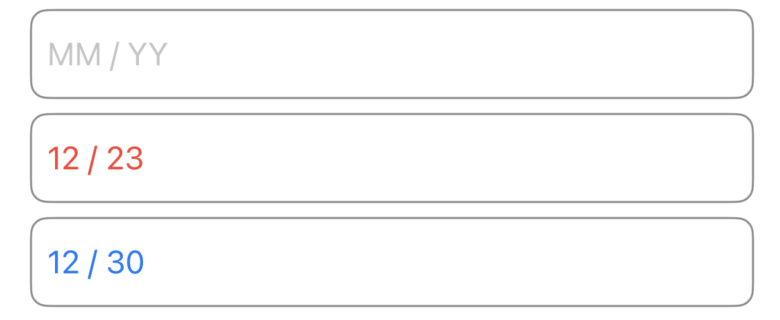
The `ExpiryDateView` view is used to collect the expiry date of the card from the user.
##### Code Sample[](#code-sample-1 "Direct link to Code Sample")
```swift theme={null}
CardNumberView(viewState: $cardNumberViewState, image: .leading)
.border()
struct ContentView: View {
@State var cardNumberViewState = ViewState(state: .blank)
var body: some View {
CardNumberView(viewState: $cardNumberViewState, image: .leading)
.border()
}
}
```
#### ExpiryDateView[](#expirydateview "Direct link to ExpiryDateView")
The `ExpiryDateView` view is used to collect the expiry date of the card from the user.
 ##### Code Sample[](#code-sample-2 "Direct link to Code Sample")
```swift theme={null}
struct ContentView: View {
@State var expiryViewState = ViewState(state: .blank)
var body: some View {
ExpiryDateView(viewState: $expiryViewState)
.border()
}
}
```
#### CvcView[](#cvcview "Direct link to CvcView")
The `CvcView` view is used to collect the CVC or CVV number of the card from the user.
##### Code Sample[](#code-sample-3 "Direct link to Code Sample")
```swift theme={null}
struct ContentView: View {
@State var cvcViewState = ViewState(state: .blank)
var body: some View {
CvcView(viewState: $cvcViewState, length: .cvc)
.border()
}
}
```
#### Additional Fields[](#additional-fields "Direct link to Additional Fields")
The `AdditionalFieldsView` is used to capture additional information about the card holder. The view is initialized with a type of the field and can be used to collect the following types of data:
* `CARDHOLDER_NAME` - to collect the cardholder name from the user. In the future, the following fields will be added:
* `EMAIL` - to collect the email from the user.
* `BILLING_ADDRESS_LINE_1` - to collect the address details from the user.
* `BILLING_ADDRESS_LINE_2` - to collect the address details from the user.
* `BILLING_ADDRESS_LINE_3` - to collect the address details from the user.
* `BILLING_ADDRESS_POSTAL_CODE` - to collect the address details from the user.
* `BILLING_ADDRESS_CITY` - to collect the address details from the user.
##### Code Sample[](#code-sample-4 "Direct link to Code Sample")
```swift theme={null}
struct ContentView: View {
var body: some View {
AdditionalFieldsView(type: .CARDHOLDER_NAME)
.border()
}
}
```
### Tokenization[](#tokenization "Direct link to Tokenization")
Once the user has filled in the fields, the data can be tokenized using the `tokenizeCard()` function of the `CardHandler` interface. To create an instance of the `CardHandler` interface, you can use the `cardHandler()` function of the Hellgate® SDK object. This section is followed by the SDK-interface for reference.
Please make sure to provide the base URL of the Hellgate® API as a parameter according to your Hellgate® usage scenario. As a second parameter, you will need to provide the `session_id` that you received from the Hellgate® API when you initialized the session on the server side. See the section Tokenize on the Web for more information.
Once created, you can initialize a Hellgate® Object which helps you to handle a session.
##### SDK Interface[](#sdk-interface-1 "Direct link to SDK Interface")
```swift theme={null}
func initHellgate(baseUrl: URL, sessionId: String) async -> Hellgate
protocol Hellgate {
func fetchSessionStatus() async -> SessionState
func cardHandler() async -> Result
}
enum SessionState: String {
case REQUIRE_TOKENIZATION
case WAITING
case COMPLETED
case UNKNOWN
}
```
##### Code Sample[](#code-sample-5 "Direct link to Code Sample")
```swift theme={null}
import Hellgate_iOS_SDK
class ContentViewViewModel: ObservableObject {
private var hellgate: Hellgate?
@Published var secretKey = ""
@Published var sessionId = ""
@Published var sessionState: SessionState?
@MainActor
func initSession() async {
self.sessionId = await fetchSessionId()
self.hellgate = await initHellgate(baseUrl: HELLGATE_URL, sessionId: sessionId)
}
@MainActor
func sessionStatus() async {
guard let hellgate = self.hellgate else { return }
self.sessionState = await hellgate.fetchSessionStatus()
}
}
```
After acquiring a Hellgate® object, you can fetch the session status and create a card handler object to tokenize the card data. Fetching the session status will return a SessionState enum which can be used to determine the state of the session. If the session is in the state `REQUIRE_TOKENIZATION` you can proceed with tokenizing the card data. After the card data was handed in successfully, the session state will change to `COMPLETE`. To hand in card data please create a cardhandler object by calling the `cardHandler()` function of the Hellgate® object. Now the `tokenizeCard()` function can be used to tokenize the card data by handing over the classes of the card number, expiry date and CVC number fields.
Also, in case you collected additional data, you can hand over a list of DataField objects to the function. The function will return a TokenizeCardResponse object. In case the tokenization was successful, the response will be of type `TokenizeCardResponse.Success` and contain the ID of the token. In case the tokenization failed, the response will be of type `TokenizeCardResponse.Failure` and contain a message.
##### SDK Interface[](#sdk-interface-2 "Direct link to SDK Interface")
```swift theme={null}
protocol CardHandler {
func tokenizeCard(
_ cardNumberView: ViewState,
_ cvcView: ViewState,
_ expiryView: ViewState,
_ additional: [AdditionalFieldType: ViewState]
) async -> Result
}
enum TokenizeCardResponse {
public struct Success: Decodable {
public let id: String
}
public struct Failure: Error, Decodable {
let message: String
var localizedDescription: String { message }
}
}
```
##### Code Sample[](#code-sample-6 "Direct link to Code Sample")
```swift theme={null}
@MainActor
func tokenize() async {
guard let hellgate = self.hellgate else { return }
let result = await hellgate.cardHandler()
if case let .success(handler) = result {
let response = await handler.tokenizeCard(
cardNumberViewState,
cvcViewState,
expiryViewState,
[:]
)
switch response {
case let .success(result):
print("Token: \(result.id)")
case let .failure(err):
print(err.localizedDescription)
}
}
}
```
##### Code Sample[](#code-sample-2 "Direct link to Code Sample")
```swift theme={null}
struct ContentView: View {
@State var expiryViewState = ViewState(state: .blank)
var body: some View {
ExpiryDateView(viewState: $expiryViewState)
.border()
}
}
```
#### CvcView[](#cvcview "Direct link to CvcView")
The `CvcView` view is used to collect the CVC or CVV number of the card from the user.
##### Code Sample[](#code-sample-3 "Direct link to Code Sample")
```swift theme={null}
struct ContentView: View {
@State var cvcViewState = ViewState(state: .blank)
var body: some View {
CvcView(viewState: $cvcViewState, length: .cvc)
.border()
}
}
```
#### Additional Fields[](#additional-fields "Direct link to Additional Fields")
The `AdditionalFieldsView` is used to capture additional information about the card holder. The view is initialized with a type of the field and can be used to collect the following types of data:
* `CARDHOLDER_NAME` - to collect the cardholder name from the user. In the future, the following fields will be added:
* `EMAIL` - to collect the email from the user.
* `BILLING_ADDRESS_LINE_1` - to collect the address details from the user.
* `BILLING_ADDRESS_LINE_2` - to collect the address details from the user.
* `BILLING_ADDRESS_LINE_3` - to collect the address details from the user.
* `BILLING_ADDRESS_POSTAL_CODE` - to collect the address details from the user.
* `BILLING_ADDRESS_CITY` - to collect the address details from the user.
##### Code Sample[](#code-sample-4 "Direct link to Code Sample")
```swift theme={null}
struct ContentView: View {
var body: some View {
AdditionalFieldsView(type: .CARDHOLDER_NAME)
.border()
}
}
```
### Tokenization[](#tokenization "Direct link to Tokenization")
Once the user has filled in the fields, the data can be tokenized using the `tokenizeCard()` function of the `CardHandler` interface. To create an instance of the `CardHandler` interface, you can use the `cardHandler()` function of the Hellgate® SDK object. This section is followed by the SDK-interface for reference.
Please make sure to provide the base URL of the Hellgate® API as a parameter according to your Hellgate® usage scenario. As a second parameter, you will need to provide the `session_id` that you received from the Hellgate® API when you initialized the session on the server side. See the section Tokenize on the Web for more information.
Once created, you can initialize a Hellgate® Object which helps you to handle a session.
##### SDK Interface[](#sdk-interface-1 "Direct link to SDK Interface")
```swift theme={null}
func initHellgate(baseUrl: URL, sessionId: String) async -> Hellgate
protocol Hellgate {
func fetchSessionStatus() async -> SessionState
func cardHandler() async -> Result
}
enum SessionState: String {
case REQUIRE_TOKENIZATION
case WAITING
case COMPLETED
case UNKNOWN
}
```
##### Code Sample[](#code-sample-5 "Direct link to Code Sample")
```swift theme={null}
import Hellgate_iOS_SDK
class ContentViewViewModel: ObservableObject {
private var hellgate: Hellgate?
@Published var secretKey = ""
@Published var sessionId = ""
@Published var sessionState: SessionState?
@MainActor
func initSession() async {
self.sessionId = await fetchSessionId()
self.hellgate = await initHellgate(baseUrl: HELLGATE_URL, sessionId: sessionId)
}
@MainActor
func sessionStatus() async {
guard let hellgate = self.hellgate else { return }
self.sessionState = await hellgate.fetchSessionStatus()
}
}
```
After acquiring a Hellgate® object, you can fetch the session status and create a card handler object to tokenize the card data. Fetching the session status will return a SessionState enum which can be used to determine the state of the session. If the session is in the state `REQUIRE_TOKENIZATION` you can proceed with tokenizing the card data. After the card data was handed in successfully, the session state will change to `COMPLETE`. To hand in card data please create a cardhandler object by calling the `cardHandler()` function of the Hellgate® object. Now the `tokenizeCard()` function can be used to tokenize the card data by handing over the classes of the card number, expiry date and CVC number fields.
Also, in case you collected additional data, you can hand over a list of DataField objects to the function. The function will return a TokenizeCardResponse object. In case the tokenization was successful, the response will be of type `TokenizeCardResponse.Success` and contain the ID of the token. In case the tokenization failed, the response will be of type `TokenizeCardResponse.Failure` and contain a message.
##### SDK Interface[](#sdk-interface-2 "Direct link to SDK Interface")
```swift theme={null}
protocol CardHandler {
func tokenizeCard(
_ cardNumberView: ViewState,
_ cvcView: ViewState,
_ expiryView: ViewState,
_ additional: [AdditionalFieldType: ViewState]
) async -> Result
}
enum TokenizeCardResponse {
public struct Success: Decodable {
public let id: String
}
public struct Failure: Error, Decodable {
let message: String
var localizedDescription: String { message }
}
}
```
##### Code Sample[](#code-sample-6 "Direct link to Code Sample")
```swift theme={null}
@MainActor
func tokenize() async {
guard let hellgate = self.hellgate else { return }
let result = await hellgate.cardHandler()
if case let .success(handler) = result {
let response = await handler.tokenizeCard(
cardNumberViewState,
cvcViewState,
expiryViewState,
[:]
)
switch response {
case let .success(result):
print("Token: \(result.id)")
case let .failure(err):
print(err.localizedDescription)
}
}
}
```